Computer Operating Systems Outcome 3 Assignment Sample
Directory Management Script For Windows 11
- 92650+ Project Delivered
- 1500+ Experts 24x7 Online Help
- No AI Generated Content



1. Introduction - Computer Operating Systems Outcome 3 Assignment Sample
The efficient directory management is one of the critical aspects that enable an efficient filing system, easy retrieval of documents, and increased efficiency of the operating system. In the context of today users are more or less required to work with directories for the purposes of navigation, creating new folders for projects or deleting the unnecessary directories. However, non-technical users most of the time struggle when it comes to using directories by means of the graphical user interface of the operating system. An interface that can be easily used by non-technical personnel is the need for this project due to the several tasks involved in directory management. This post specifically covers a user script written in Python for managing the directories furnished for Windows 11. Using the script, it is possible to create new directories, re existing ones and even delete, apart from having a way to terminate the script. It is hence important to outline general steps on how the script can be used for managing directories based on the information requirement from users who may not have prior programming experience. Another goal of the step-by-step instructions completed with detailed descriptions and examples is to minimise the hardships linked to directories’ management via the CLI. This paper presents a brief description of the Directory Management Script, necessary requirements for its running and a step-by-step guide on how to execute the script. Moreover, the script also traces; testing and validation to check for correctness in the events as the script proceeds in different ways. The guide also describes development issues faced, measures taken and other possible enhancement in future. At the end of the report, users shall be able to understand how to go about it and even use the script to manage directories on Windows 11.
Transform your grades with New Assignment Help! Our experienced writers deliver high-quality, plagiarism-free assignments tailored to your requirements. Academic success is just a click away!
2. Overview of the Script
Scripting is an essential practice in system administration that enables users to execute repetitive tasks, perform different operations in one go and reduce time wastage. It can be said that the employment of directory services helps non-technical users to manage their file systems with improved procedures other than manual methods (McDonald et al. 2022). The Python code provided in this article allows users, especially those who have a hard time with Windows 11 directory listing, to simply deal with the file system.
Python language was used in the context of scripting on the basis of its simplicity, easy syntax to learn and its capability to run in windows. Python pre-implemented os module carries lots of ability to build connection with operating system and performing some other operations like file and directory (Motero et al. 2021). The script also works with the creation, renaming, and deletion of directories based on the functionalities of the Python compiler as well as incorporating an easy to use operating system for directory navigation.
To meet the scripting needs, the script features such elements as the data values’ input and manipulation through variables, sequence, selection, and iteration, as well as ability to accept necessary arguments (Mokhtar et al. 2022). Moreover, there is documentation of every portion of the script in an easy-to-understanding language and the testing methodology of this script is also systematic.
Key functionalities of the script include the following:
- Creating Directories: Users can input a directory to create a new folder. If the directory already exists, an error message is displayed.
- Renaming Directories: Users can re existing directories by providing the current and new directory s. Error handling is implemented to manage incorrect inputs.
- Deleting Directories: It is possible to delete directories that are already created in case they are empty. If the directory is not found or is a directory containing files, such an error message will be shown.
- Exiting the Script: Users can safely exit the script using the menu option, ensuring no unintended operations occur.
As the script is intended for non-technical users, those specific actions related to directory management on Windows 11 will be automated (Keyogeg et al. 2024). The next sections of this guide contain detailed information about how to employ the script and instructions for checking the reliability of its work.
Resolving kernel-level networking issues in OS assignments is easy with qualified Computer Network Assignment Writers.
3. System Requirements (200 words)
When running the directory management script there are certain system requirements that must be met as outlined below; this script is for Windows 11 since its structure of files and commands are different from other windows operating system structures. It could work on the prior versions of Windows but may require some changes for its proper performance.
One important prerequisite to execute the script is the installation of Python 3. To check whether Python is installed or not just open the cmd and type
python --version.
In case Python is not recognized in the operating system, it has to be installed and downloaded from the official Python website (Leygonie et al. 2022). While performing the installation process, one should tick the box explaining that Python needs to be added to the system and/or user path when the program is to be run into.
Another is the need of a good text editor that would be used in writing and editing of the script. Visual Studio Code (VS Code) is ideal due to factors such as the interface that it has, co_editing features and integrated debugger. However, Notepad++ or Notepad could be preferred, despite the availability of more native functions than the prior applications.
To carry out this script, the user should ensure Python is properly installed and running on the Command Prompt. Some knowledge of ‘Command Prompt’ such as ‘cd’ which enables you to switch between directories and ‘dir’ which allows you to look into the files and directories present will help you get around well when using the script (Charan et al. 2023). Satisfying these conditions makes sure that the usage of the directory management script is as smooth as possible.
4. Step-by-Step Guide for Script Execution
Step 1: Creating the Python Script
In the first steps to our solution, the text editor such as Visual Studio Code can be opened. Proceed to create a new file and give it the title directory_manager.py. One should recommend that the file is saved in an easily accessible folder such as the Desktop or the Documents. See to it that the file ending is changed to .py in order to denote a Python file.
Step 2: Writing the Script
The concept of writing the directory management script comes from having an understanding of the features of a directory management script and, ultimately, creating one that will suit the goal that needs to be accomplished. The primary goal is to design the program that effectively operates with directories for a non-professional user knowing a functional approach and menu system (Gibadullin and Nikonorov 2021). This script uses Python language as a result of its clear syntax, easy coding and compatibility with Windows 11.
Importing the os Module
The OS module in Python is an interface to some of the user environment facilities offered by the OS. It requires performing the directory related operations such as creating, renaming and removing a directory (Lavayssière et al. 2022). The OS system is imported at the start of the script to be able to use such functions:.
import os
This line opens several methods of operating system access needed for the operations on the directory level.
Defining Functions for Directory Management
The operations involved in creating, renaming, and deleting directories are implemented as separate functions due to the modularity of the script. These functions make the code reusable and thereby more manageable as compared to other pieces of code.
- Function to Create Directory: The create_directory() of this class is specifically designed with the purpose of creating a directory. It promotes the ability to take user input for a directory and checks to see whether there is an existing directory with the similar before creating it.
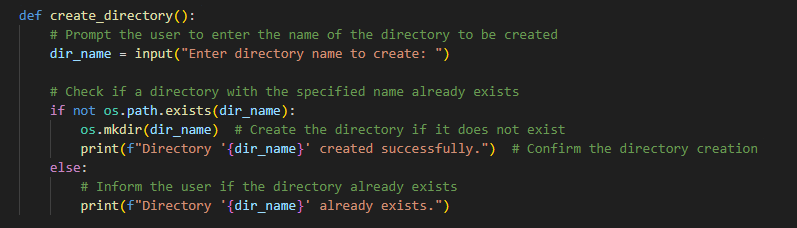
Figure 1: Creation of Directory
- Re Directory Functionality: The re_directory() function which is in the script helps the user to re an existing directory (Chen et al. 2023). This way, it first verifies if the directory within which it will be renaming exists:
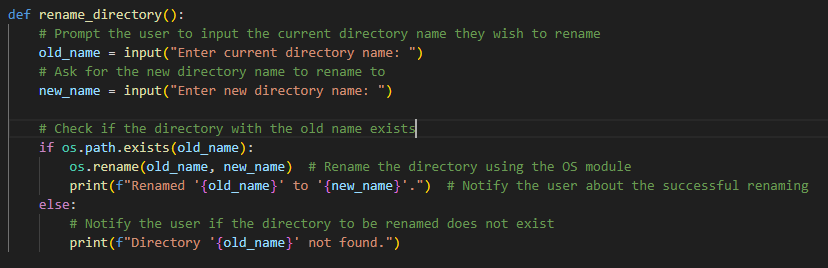
Figure 2: Implementation of Re Directory
- Function to delete an Existing, Empty Directory delete_directory Exiting empty directory delete_directory() function will remove an existing directory that is already or can be considered empty (Oreto et al. 2021). It checks for the existence of the directory and also ensures that the said directory is not empty before proceeding to delete it:
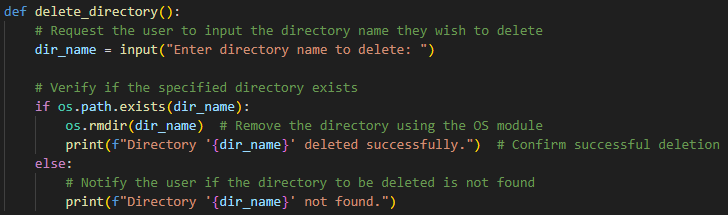
Figure 3: Implementation of Delete Directory
Loop Structure for the Main Menu
While True is utilized in setting up the menu structure, which provides the user with options until he or she closes the script. This makes the directory usable by presenting clear choices for each task of directory management to the user.
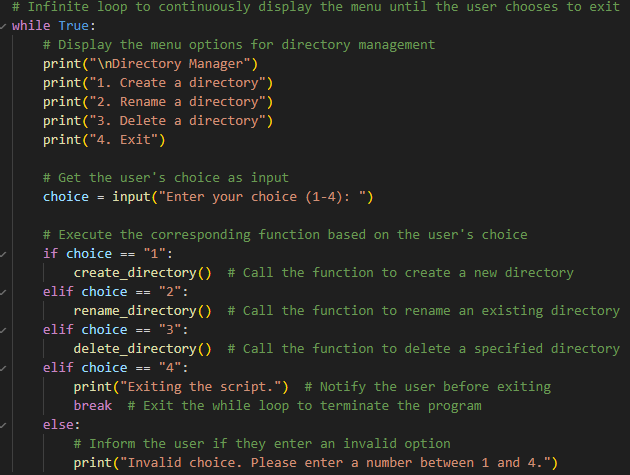
Figure 4: Implementation of Main Loop
Step 3: Running the Script
Use the ‘cd’ command to get to the directory the script is stored in when opening the Command Prompt. If the script is saved on the Desktop or if anywhere in other folder then type that path of folder:
Cd Desktop or cd C:\Users\User\Desktop\new
Run the script using:
python directory_manager.py
The user has to carefully go through each of the options on the menu instructions so as to be able to create the new directory, re, delete a directory, or quit.
Step 4: Using the Script
The directory management script is easy to use and gives convenience to its users. This makes it possible for the user to make a choice of the following four options once the script is initiated. When it comes to creating a directory, one can just type 1 and input the of the directory. To do so, the script verifies that the directory is present; if not, it makes the directory and this is accomplished successfully. To re a directory, type ‘2’ and proceed to type the current directory as well as the new that has not been in use by any directory. If the mentioned directory is not created or it is wanted to change and the new already exists, then this script will show an error message. If you wish to delete any directory, enter 3 and give the directory . The script offers confirmation that the directory actually exists and anyone using the program will find it to be empty before being deleted. If it is empty or if this variable does not exist, an appropriate error message is displayed (Guo et al. 2024). Last of all, to come out of the script, type 4 and the program will then come to an end. For each interaction there is feedback to make the usage of the product comfortable for ordinary users.
5. Testing and Validation
The testing of the directory management script was done manually since the Command Prompt feature is used in Windows 11 system. Manual testing gives an opportunity to observe the script be as interactive as a user and to consider its further actions depending on the user’s inputs. Energy was placed on how the script reacted to proper-syntax inputs yet insisting on improper ones, and success in failure. Some of the test cases carried out were: Creating a directory, attempting to create a directory that has already been created, renaming of a directory, attempting to re a directory that had not been created, erasing an empty directory, erasing a directory that had not been created, and finally erasing a directory that contained some files (Alsaffar et al. 2022). These scenarios contributed in confirming the efficiency of the script and its effectiveness in the case of having a large number of results.
Looking at the fact that structured and comprehensive testing was required, test cases had to be designed. For each of the test cases provided there was test case description, test case input, expected result and actual result along with the result status (Umar et al. 2021). These test cases are real-life like and cover with possibility which any other non-technical user may encounter using script. The testing was done on the following areas:
- Functionality Testing: Ensuring that the script can accurately create, re, and delete directories based on valid inputs.
- Error Handling: To ensure that the script has correct error handling and termination when operation involves non-existent targets such as renaming or deleting directories.
- Edge Case Testing: Categorizing the concepts associated with the script, such as an error that occurs while trying to remove a directory that contains files.
The outcomes of the testing process are portrayed in the following table that presents the response of the script for each tested case:
|
Test Case |
Input |
Expected Outcome |
|
Create a new directory |
TestFolder |
Directory 'TestFolder' created successfully. |
|
Create the same directory again |
TestFolder |
Directory 'TestFolder' already exists. |
|
Re a directory |
TestFolder → RedFolder |
Red 'TestFolder' to 'RedFolder'. |
|
Re a non-existent directory |
DoesNotExist → NewName |
Directory 'DoesNotExist' not found. |
|
Delete a directory |
RedFolder |
Directory 'RedFolder' deleted. |
|
Delete a non-existent directory |
FakeFolder |
Directory 'FakeFolder' not found. |
|
Exit script |
4 |
Script exits successfully |
Table 1: Testing Table
Every test case was run several times to ensure that the script’s behavior is consistent with the expected results. In creating the directory, the script was apt in checking if the directory had already been created and made relevant remarks. Likewise, the renaming functionality tested for the existence of the particular directory in the system (McIntosh et al. 2023). The deletion function was thoroughly reviewed to understand how it was capable of removing the empty directories with the ability to avoid eradication of non-empty directories. The exit functionality enabled the users to close the script and exit from the application without force quits.
To test these functionalities the work also sought to identify how the script would handle improper inputs. For instance, when the script was run with an effort to delete a directory that has not been created, it identified the fact correctly and a message corresponding to the error was provided. It made the users receive informative feedback with minimal directing them in the right direction or inputting approach.
Also, error handling used in the script was quite effective in the general confirmation of the experience. Feedbacks like “The directory already exists” or “The directory does not exist” were informative and appropriate for lay audience. These messages are useful when it comes to realizing a convenient user experience since it informs the user what went wrong and how to fix it.
From the testing phase it can be concluded that the directory management script fits the requirements set for it and offers a simple and usable interface for non-professional users. Valid and invalid inputs suggest the appropriateness of the working of the script within a real-life environment (Pour-Aboughadareh et al. 2022). The testing procedure ensured the script serves its intended purpose and, therefore, useful for directories administrators that do not necessarily understand heavy programming.
Challenges and Solutions
Some of the challenges encountered when developing the directory management script are as follows; one of the major factors was the graphical user interface since the system was intended for use by non-technical users while at the same time the script had to have a robust functionality. The first one was to make the interface for the interaction friendly through the Command Prompt, which would be confusing for users who were not accustomed to command-based interfaces.
Another issue was addressing errors in the code that are likely to occur, for example the program trying to remove a non-empty directory or giving an invalid directory (Kim et al. 2021). The mishandling of directories is that the users may lose some information along the way or ordinary users are bound to be confused regarding the concept of directories.
In order to take care of the above challenges, the following strategies were adopted:
- User-Friendly Prompts: All the options were well marked and where there were several on a particular menu options, further instructions were given as to their functions. This helped in mitigating the use of technical language which made it easy to understand most of the terms which were used.
- Error Handling: To handle errors, certain Python exception handling tools like try-except for error codes and using try-except block-catchers like FileNotFoundError and OSError were incorporated into the code. These measures made certain that the script does not end upon encountering an error; instead, it should handle the error politely and without interruption.
- Validation Checks: When renaming or deleting directories, validation checks were carried out to check for the existence of the directories to be operated on (Jayasuryapal et al. 2021). This approach made it possible to avoid such actions and losses that could have otherwise occurred accidentally.
However, there are some drawbacks as the script does not have the capability to directly remove non-empty directories (Prati et al. 2021). There are potential enhancements that could be considered in the future and they include, more sophisticated directory traversal to deal with safely removing non-empty directory or whether to make an option of moving the contents of the directory before deleting the entire directory.
Conclusion
This user guide demonstrated how to create a script in Python for simple directory management for the operating system of Windows 11, addressing the basic operations including creating a directory, renaming a directory, as well as removing a directory. Each of the mentioned sections described the general and specific purpose of the script, the process of its creation as well as its assimilation in the system administration, and the significance of scripting in the context of system administration and the benefits of using Python as the language for scripting.
Using the step by step procedure this web page guides the users on setting the right environment, writing and executing a script. Proper testing and validation of the script proved it works optimally and suitable to handle different conditions irrespective of the error handling mechanisms in place. It was also easy to understand prompts that commenced with clear instructions and easy to follow menus, which allowed users who are not so conversant with the computer systems to operate the script freely.
From the objective perspective of the script, there are the following additional functionalities which can be developed in order to increase the usability for non-technical users: The ability to handle non-empty directories. ')' Further enhancement of the graphical interface. They could include a much more efficient directory management for the end consumers that do not have much knowledge in IT.
In summary, the directory management script is equally a perfect companion to users in their quest to find a perfect way of managing their directories on Windows 11. It deals with directory functions in a very easy and friendly way which means even users in an organization who may not be so conversant with computers can be able to manage their programs without so much of a challenge.
Reference List
- McDonald, G., Papadopoulos, P., Pitropakis, N., Ahmad, J. and Buchanan, W.J., 2022. Ransomware: Analysing the impact on Windows active directory domain services. Sensors, 22(3), p.953.
- Mokhtar, B.I., Jurcut, A.D., ElSayed, M.S. and Azer, M.A., 2022. Active directory attacks—steps, types, and signatures. Electronics, 11(16), p.2629.
- Keyogeg, B., Thompson, M., Dawson, G., Wagner, D., Johnson, G. and Elliott, B., 2024. Automated detection of ransomware in windows active directory domain services using log analysis and machine learning. Authorea Preprints.
- Leygonie, R., Motamedi, A. and Iordanova, I., 2022. Development of quality improvement procedures and tools for facility management BIM. Developments in the Built Environment, 11, p.100075.
- Motero, C.D., Higuera, J.R.B., Higuera, J.B., Montalvo, J.A.S. and Gómez, N.G., 2021. On attacking Kerberos authentication protocol in windows active directory services: A practical survey. IEEE Access, 9, pp.109289-109319.
- Charan, P.V., Chunduri, H., Anand, P.M. and Shukla, S.K., 2023. From text to mitre techniques: Exploring the malicious use of large language models for generating cyber attack payloads. arXiv preprint arXiv:2305.15336.
- Gibadullin, R.F. and Nikonorov, V.V., 2021, September. Development of the system for automated incident management based on open-source software. In 2021 International Russian Automation Conference (RusAutoCon) (pp. 521-525). IEEE.
- Lavayssière, C., Larroque, B. and Luthon, F., 2022. Laborem Box: A scalable and open source platform to design remote lab experiments in electronics. HardwareX, 11, p.e00301.
- Chen, C., Wu, Y., Li, J., Wang, X., Zeng, Z., Xu, J., Liu, Y., Feng, J., Chen, H., He, Y. and Xia, R., 2023. TBtools-II: A “one for all, all for one” bioinformatics platform for biological big-data mining. Molecular plant, 16(11), pp.1733-1742.
- Oreto, C., Massotti, L., Biancardo, S.A., Veropalumbo, R., Viscione, N. and Russo, F., 2021. BIM-based pavement management tool for scheduling urban road maintenance. Infrastructures, 6(11), p.148.
- Guo, C., Liu, X., Xie, C., Zhou, A., Zeng, Y., Lin, Z., Song, D. and Li, B., 2024. Redcode: Risky code execution and generation benchmark for code agents. Advances in Neural Information Processing Systems, 37, pp.106190-106236.
- Alsaffar, M., Aljaloud, S., Mohammed, B.A., Al-Mekhlafi, Z.G., Almurayziq, T.S., Alshammari, G. and Alshammari, A., 2022. Detection of Web Cross-Site Scripting (XSS) Attacks. Electronics, 11(14), p.2212.
- Umar, R., Riadi, I. and Kusuma, R.S., 2021. Mitigating sodinokibi ransomware attack on cloud network using software-defined networking (SDN). International Journal of Safety and Security Engineering, 11(3), pp.239-246.
- McIntosh, T., Kayes, A.S.M., Chen, Y.P.P., Ng, A. and Watters, P., 2023. Applying staged event-driven access control to combat ransomware. Computers & Security, 128, p.103160.
- Pour-Aboughadareh, A., Khalili, M., Poczai, P. and Olivoto, T., 2022. Stability indices to deciphering the genotype-by-environment interaction (GEI) effect: An applicable review for use in plant breeding programs. Plants, 11(3), p.414.
- Kim, K., Alfouzan, F.A. and Kim, H., 2021. Cyber-attack scoring model based on the offensive cybersecurity framework. Applied Sciences, 11(16), p.7738.
- Prati, E., Villani, V., Peruzzini, M. and Sabattini, L., 2021. An approach based on VR to design industrial human-robot collaborative workstations. Applied Sciences, 11(24), p.11773.
- Jayasuryapal, G., Pranay, P.M. and Kaur, H., 2021, April. A survey on network penetration testing. In 2021 2nd International Conference on Intelligent Engineering and Management (ICIEM) (pp. 373-378). IEEE.