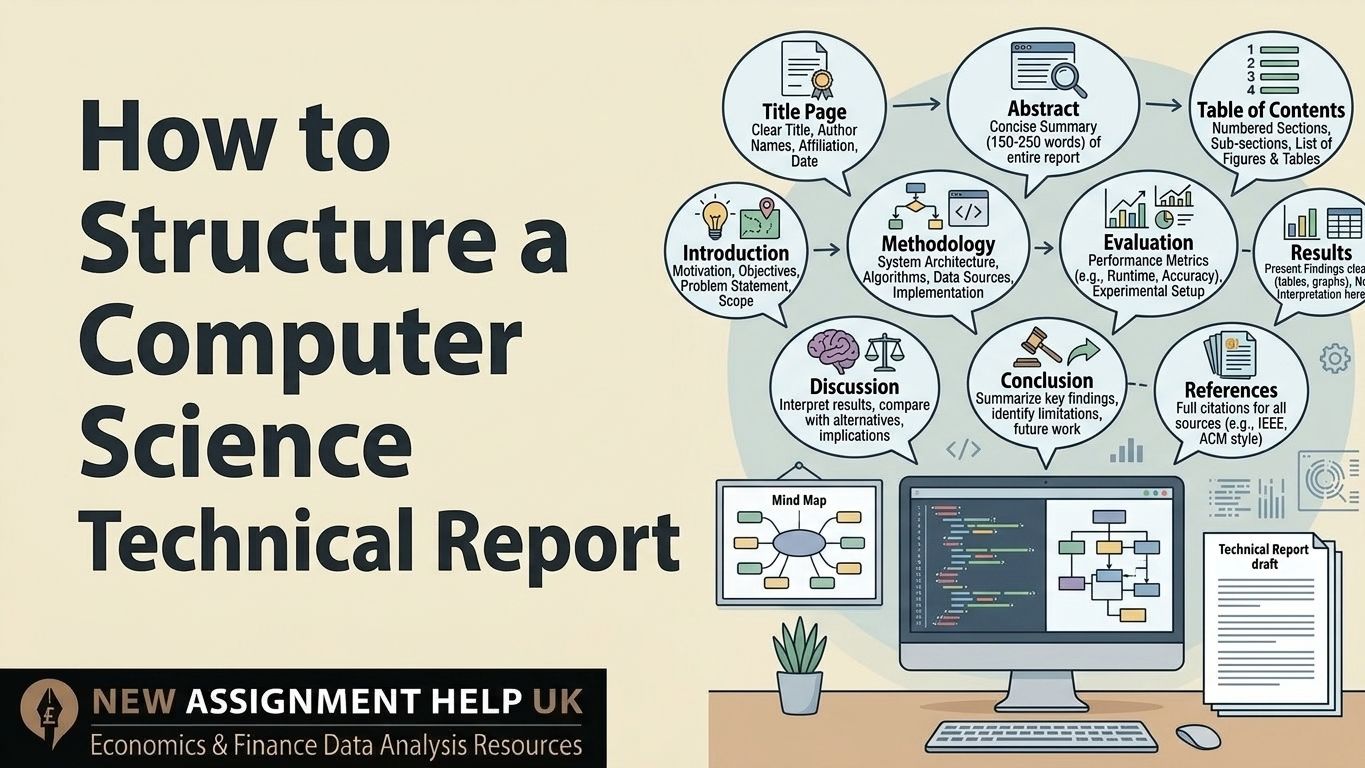
How to Structure a Computer Science Technical Report
- Computer Science Technical Report Format: The Complete Academic Structure
- How Is a Technical Report Different From an Assignment?
- What Goes on the Title Page?
- How Do You Write an Abstract?
- Why Do You Need a Table of Contents?
- What Should the Introduction Section Cover?
- What Is Related Work or a Literature Review?
- How Do You Write the System Design or Methodology?
- What Is the Difference Between Methodology and Implementation?
- What Goes in Results and Evaluation?
- How Do You Write the Discussion?
- What Should the Conclusion and Future Work Include?
- How Should You Write References and Appendices?
- Final Thoughts
Computer Science Technical Report Format: The Complete Academic Structure
The computer science technical report format is a fixed order for showing your work. It covers the problem, the design, the build, and the test results of a computing system. Many students treat it like a normal assignment, but it follows a formal engineering structure and is used by both universities and tech companies. This guide explains the structure of a technical report in CS, based on standard IEEE style. So before we begin, let's see what makes a report different.
How Is a Technical Report Different From an Assignment?
An assignment asks you to answer a question. But in a technical report, you have to show how you solved a problem. And this is the biggest gap.
- It is not based on opinion, like an essay; but it completely emphasises critical thinking.
- A technical report focuses on systems, algorithms, and experiments.
- You have to mention proof, like data, outputs, and screenshots in your report.
- The CS report follows a formal engineering layout.
Once you see this, the layout for your report feels easy. Let's begin with the very first page.
What Goes on the Title Page?
The title page is the identity of your report. Keep it clean and formal. Add a clear title that describes your work, your name, your university, and the submission date. If your course asks for it, add a report number too. Next comes the part most readers look at first.
How Do You Write an Abstract?
An abstract is a short summary of your whole report, about 150 to 200 words. It states the problem, your method, your key results, and your conclusion. Write it last, after everything else is done. A good abstract helps readers understand your work in under a minute. After that, readers need a map.
Why Do You Need a Table of Contents?
A table of contents in technical reports lists every section with its page number. Long reports can also add a list of figures and a list of tables. It helps readers jump straight to what they need. Now here comes the real writing.
What Should the Introduction Section Cover?
This section frames your problem. Therefore, establish the query domain and outline current limitations. Do not just talk about the topic. Explain why your system needs to exist. Include:
- The problem you are solving
- Why it matters
- Your aims or objectives
- What you will cover and what you will skip
- A quick look at how the report will be organised
This shows what your work adds. Next, show what already exists.
What Is Related Work or a Literature Review?
Related work shows that your project does not stand alone. That's why you must position your work with existing research and tools here. Point out where they fall short. Then name the gap your system fills. Teachers value this because it proves you did your homework. With the gap clear, you can explain your plan easily.
How Do You Write the System Design or Methodology?
This is the core technical section. It explains how your system is planned. Add these:
- Architecture: a block diagram or flowchart
- Algorithms: sorting, searching, databases, or AI models
- Design choices and the reason behind each one
- Experimental setup: if you ran tests
Make it detailed enough that another student could analyse from your work. Good diagrams save a lot of words. Now let's talk about the actual build.
What Is the Difference Between Methodology and Implementation?
Methodology is the design logic. Whereas implementation is the building process. Here, you have to mention your programming languages and libraries or frameworks, like Python, Java, or React. Also describe your hardware and software setup. With this, share any limits you faced, such as time, memory, or budget while preparing your report. After the build comes the proof.
What Goes in Results and Evaluation?
The report includes facts only. So use graphs, tables, and logs. Add numbers like run time, accuracy, and efficiency. If you can, compare your system with a benchmark. And do not explain the numbers yet. For example: "The system sorted 1,000 records in under 2 seconds." Short and measurable. Now we can ask why those results happened.
How Do You Write the Discussion?
This is the thinking section, and it often earns the highest marks. Therefore, explain why your results happened. Talk about the limits of your system and trade-offs, like speed versus accuracy. Keep this section separate from your results so each one stays clear. Then you are ready to close.
What Should the Conclusion and Future Work Include?
Sum up what you built and say whether you met your aims or not. Name your main contribution. After that, you can suggest next steps, such as better scaling, AI features, or a friendlier interface. Keep it short and forward-looking.
How Should You Write References and Appendices?
List every paper, framework, and dataset you used in IEEE or ACM style. Good references make your report more trusted. Also put extra material in the appendices, like code snippets, large datasets, bonus diagrams, and configuration details for making it more precise. This keeps your main report neat.
Final Thoughts
A CS technical report is a detailed document which shows the process, progress and results of scientific research. And once you understand the whole process of how to write, then everything seems easy. Take it one section at a time, and your next report will feel clear and professional. You can also seek CS assignment assistance if anything feels tough.

 8 | MSc in Software Engineering
Daniel Marcus is a computer science writer and academic mentor based in Manchester, UK. He holds a BSc in Computer Science and an MSc in Software Engineering, and he has spent over eight years helping UK university students with programming, algorithms, and technical reports. Daniel has guided thousands of learners through Python, Java, and C++ assignments, from first-year basics to final-year projects. He knows what markers look for because he has seen where students gain and lose marks. His goal is simple: make hard ideas easy to understand. When he is not writing, Daniel enjoys open-source projects and coaching beginners.