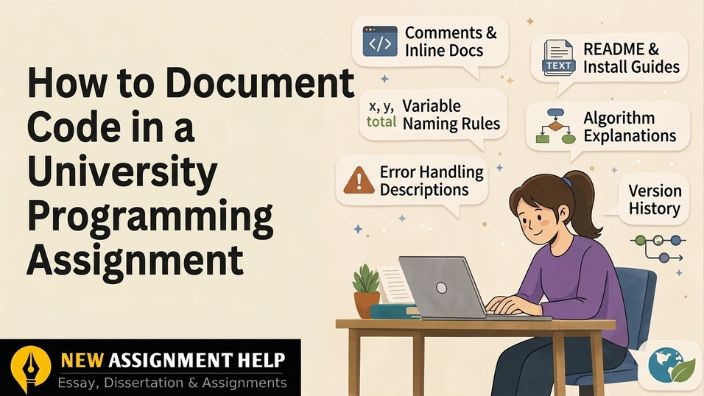
How to Document Code in a University Programming Assignment
If you want to document code in a university programming assignment properly, you need two things: clear comments inside your code and a short written explanation outside it. Most students only do one or do both badly and lose easy marks because of it. Documentation can be worth 10 to 30 percent of your grade, yet many students treat it as something to add in the last five minutes. This guide on how to document code in programming covers what well-documented code actually means and the steps to create such code. It also highlights the key points that cost your marks and tips to refine your programming assignment. So let's start with the basics first.
What Does "Documenting Code" Actually Mean?
At its core, documenting code means writing comments and organising your work so someone reading it doesn't have to guess what is written. But there's a difference between a few things that people often lump together. Comments explain a specific line or block. Meaningful naming refers to picking variable names that actually describe what they hold, instead of vague labels like 'x' or 'data1'. External documentation, like a README, gives the bigger picture of the whole project. Your university isn't just checking if the programme runs. They want proof that you understand what you built. Now let's understand the types of documentation.
The Three Types of Documentation You'll Need
Every good assignment usually covers three layers of documentation.
File-level documentation sits at the very top of your file. It's a short header which includes your name, student number, module, and a one-line description of the programme's purpose.
Function- or class-level documentation comes as docstrings placed right above each function. They tell the reader what the function does, what it takes in, and what it hands back.
Inline comments are the small notes scattered next to individual lines. Good ones explain the reasoning behind a decision, not the obvious mechanics of the syntax.
Here's what you need to know. None of these work well alone. A header without inline notes leaves the reader lost inside the logic. Inline notes without a header leave them lost about the purpose. You need all three stitched together so the story of your code makes sense from top to bottom.
With that groundwork in place, let's get into the actual process of documenting your programming assignment.
A Step-by-Step Way to Document Your Code
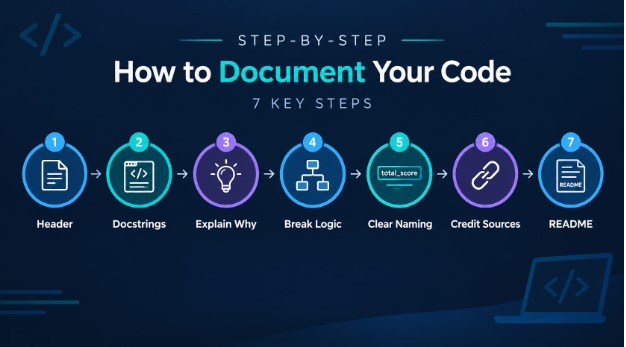
Step 1: Start With a Clear File Header
Put your name, module code, submission date, and a short line describing the programme right at the top.
Step 2: Write Docstrings for Every Function
Just above each function you have written, note what it does, what parameters it expects, and what it gives in return.
Step 3: Add Comments That Explain "Why", Not "What?"
In this step, skip comments that just restate the code and do not describe it. Explain the reasoning instead, like why you picked a certain loop or condition.
Step 4: Break Down Complicated Sections
If your code consists of a formula, an algorithm, or a condition with several parts, add a short line under each which defines the logic behind everything.
Step 5: Let Your Code Explain Itself
Names like 'total_score' or 'student_count' tell their own definition. Thus, the clearer your naming, the fewer comments you'll even need.
Step 6: Credit Any Outside Sources
If a formula, snippet, or idea came from somewhere else, mention it briefly without explaining much. This keeps you safe from plagiarism flags.
Step 7: Add a README When It's Asked For
This should cover how to run the program and give a short summary of what it does.
Once this seven-step structure comes into your routine, your assignments start reading like they were written by someone who actually gets the subject. This will increase the credibility of your work and will help you score well.
What Well-Documented Code Actually Looks Like
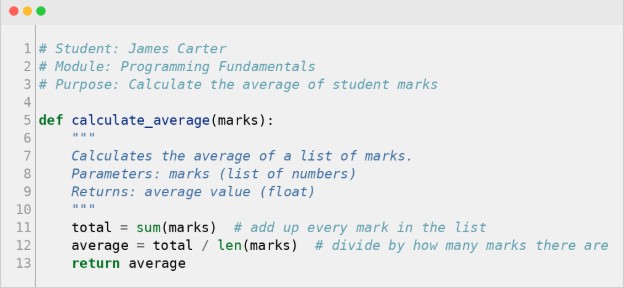
The header gives context in two lines. The docstring tells you exactly what the function needs and gives back. The inline comments explain the small steps without repeating what's already obvious from the code itself. That balance is what markers are actually looking for.
Mistakes That Quietly Cost You Marks
A few errors show up again and again in student work, and they're easy to fix once you know what to look for.
- Commenting on lines that are already self-explanatory
- Leaving functions with no docstring at all
- Reusing comments from a tutorial without adjusting them to your own code
- Comments that no longer match the code after you changed something
- Messy spacing and inconsistent formatting throughout the file
Bringing It All Together
When you are documenting your code, make sure you write your comments with proper explanation. Keep the wording plain and skip unnecessary jargon. Stick to one style of commenting throughout the whole file instead of switching in the middle of the assignment. And if you are struggling to understand any of the steps, you can look for programming assignment support to benefit yourself with the clear understanding and increase the overall quality of your work.

 10 | MSc in Computer Science
With a decade of hands-on experience, Anne Franklin works as a UK-based programming tutor and academic writer who supports university students through their coding assignments. She holds a Master's in Computer Science and has spent years working closely with students on Java, Python and C++ modules. Anne has helped hundreds of students tackle debugging, documentation and assignment planning, breaking down dense or unclear briefs into clear, practical steps they can actually follow. Her writing prioritises exam-ready, usable guidance over abstract theory. Outside of tutoring, she regularly reviews open-source projects and keeps pace with the coding practices currently taught in UK universities.