
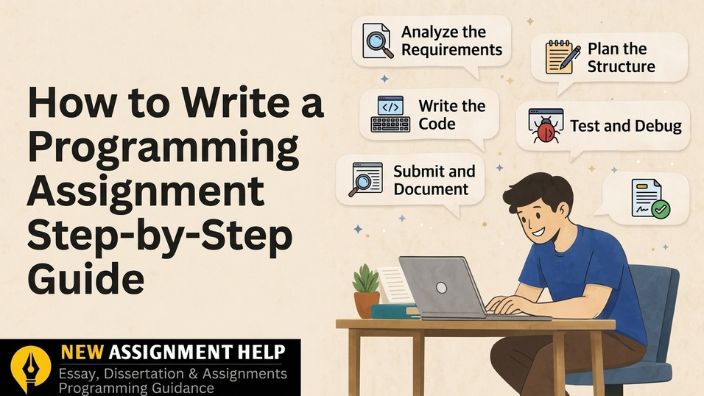
How to Write a Programming Assignment: A Step-by-Step Guide
- Step-by-Step Guide on How to Write a Programming Assignment
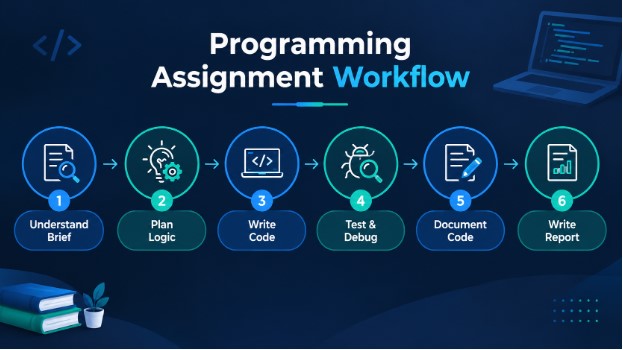
- Step 1: Understand the Assignment Brief
- Step 2: Plan Your Logic Before Coding
- Step 3: Write Clean and Efficient Code
- Step 4: Test and Debug Your Program
- Step 5: Document Your Code Properly
- Step 6: Write the Assignment Report
- Common Mistakes You Should Avoid While Writing These Assignments
- Bringing It All Together
Step-by-Step Guide on How to Write a Programming Assignment
A programming assignment requires you to write, test, and debug code written with specific logic. But that is only half the job. You also need to explain your code and show the output. Many UK students find this tricky. Some struggle to understand the logic behind the problem. Others can write the code but cannot explain it clearly. This guide on how to write programming assignments will support you with a simple, step-by-step method for writing a programming assignment. It also covers what your tutor expects in both the code and the writing, so you can plan, build and submit with confidence. Let's work on every step and understand the process of writing a programming assignment clearly.
Step 1: Understand the Assignment Brief
Always start with the brief, not the keyboard. Many students often rush into coding without considering key details in their assignment. Take a few minutes to note these points:
- The programming language you must use
- The input and output rules
- Any limits, such as time, memory or file format
Next, read your marking rubric slowly. It shows you exactly where the marks are. Then break the question into smaller tasks. A long brief looks scary, but five small tasks feel easy.
Quick tip: To understand the brief in detail, underline action words like design, implement, analyse.
Step 2: Plan Your Logic Before Coding
Don’t jump straight into the editor and start typing. Take a few minutes to plan first, as it saves a lot of stress later. Write out the steps in plain language (this is called pseudocode) or sketch a simple flowchart so you can see how the program should flow from start to finish.
Step 3: Write Clean and Efficient Code
Once you start coding, keep things tidy and simple. Give your variables clear names (use total_marks instead of just x). Indent your code properly so the structure is easy to read. And stick to the normal style rules for the particular language you’re using; for example, Python uses PEP 8.
Do not use repetitive lines again and again. If you copy a block twice, turn it into a function. Also avoid tricks that make your code harder than it needs to be. Also focus on readability and simplicity in your writing.
Step 4: Test and Debug Your Program
Do not present the code without proper checks. After completion, run it with normal inputs. Then try using edge cases, such as zero, negative numbers or empty lists. Finally, check that the output is right and should not have any runtime errors. If something breaks, do not guess. Trace your logic line by line and watch where the values change.
Step 5: Document Your Code Properly
Comments turn your code into something others can follow. Therefore, add short comments that could explain your logic. Describe what each function does. Write the purpose of the programme at the top, and note key decisions, such as why you chose a list instead of a dictionary. But do not comment every obvious line. Writing "add 1 to count" next to "count = count + 1" only adds noise.
Step 6: Write the Assignment Report
Your code shows that it works. Your report must provide a clear understanding of what is written. Go for this simple structure for your programming report:
- Introduction: Say what problem you solved.
- Methodology: Describe the methodology or algorithm that was used and the reason for its selection.
- Implementation: Thoroughly check the main sections of your code.
- Results: Provide the output of your work. A screenshot can be placed if your assignment allows that.
- Conclusion: Discuss what you achieved and what you learned from this project.
Keep your language plain and your sections short. Use clear headings so the marker can find each part quickly. Link each section back to the marking rubric so no mark is missed.
This is where you convert technical work into an organised and properly guided programming assignment.
Common Mistakes You Should Avoid While Writing These Assignments
These mistakes cost students the most marks. Take a look at them below and build your next programming assignment with better results.
- Coding without planning
- Ignoring the output format
- Leaving out comments
- Copy-pasting code you do not understand
- Not testing properly
Here, copying is the most serious mistake. Universities often check code for similarity, and it may lead to an academic misconduct case. Therefore, make sure to write your own code and mention any source you have used in your assignment.
Bringing It All Together
A programming assignment is a mix of logic, code and explanation. You need all three to score well. When you follow a clear structure, your work becomes cleaner and your marks go up. So keep practising. Start with small tasks, plan each one, test it, and write down your thinking. Every assignment you finish makes the next one easier. You can also look for programming assignment guidance if you want to know more about coding and related error-handling methods.

 10 | MSc in Computer Science
With a decade of hands-on experience, Anne Franklin works as a UK-based programming tutor and academic writer who supports university students through their coding assignments. She holds a Master's MSc in Computer Science and has spent years working closely with students on Java, Python and C++ modules. Anne has helped hundreds of students tackle debugging, documentation and assignment planning, breaking down dense or unclear briefs into clear, practical steps they can actually follow. Her writing prioritises exam-ready, usable guidance over abstract theory. Outside of tutoring, she regularly reviews open-source projects and keeps pace with the coding practices currently taught in UK universities.